Time spent working with AI: how we collect the metrics
· 4 min read · AI · SDD · OpenSpec
The agent has produced a result. Someone still needs to read it, check it, make corrections or ask for another attempt. All of that takes time too. Looking only at how long the agent ran leaves part of the effort out of the report.
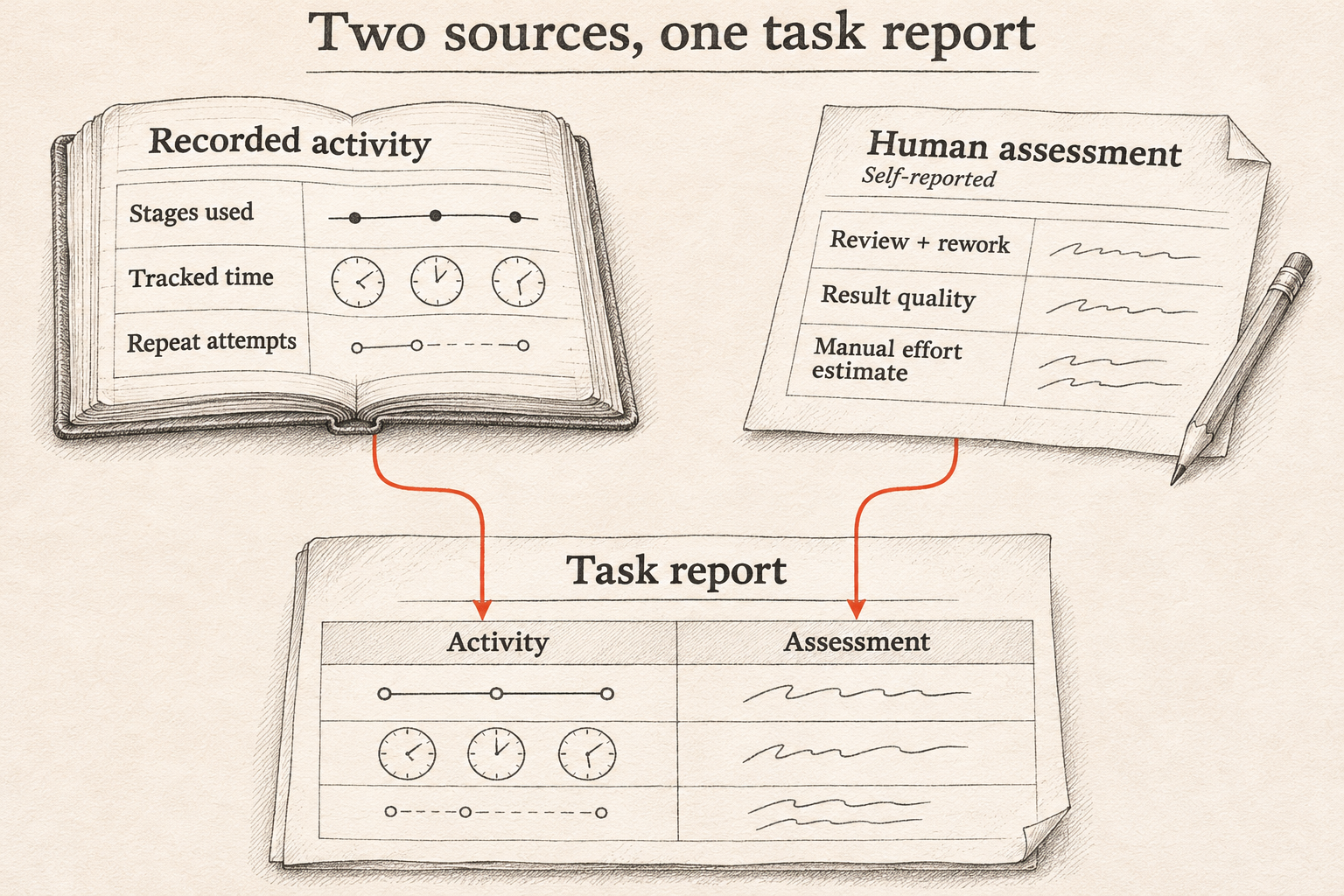
When the team moved to SDD and a shared hub, we connected metrics collection for agent usage. My part was to configure collection through hooks and help the team fit it into their work. The report combines data about completed stages with the participant's assessment: how much rework was needed and how long the same work might have taken manually.
Where the data comes from
Work on a change goes through OpenSpec skills, from preparing requirements to implementation and verification. Hooks are attached to these calls. They record events that the collector uses to track the agent's work on a particular stage.
This gives a task a history: which stages were started, which finished and where another attempt was needed. Requirements work is visible separately from implementation. An analyst, a developer and a tester can all contribute to the same task, each with their own part of the work.
Events are saved locally. The prepared data is then sent to a shared system and appears on dashboards. There is no need to reconstruct the agent's activity manually from the conversation.
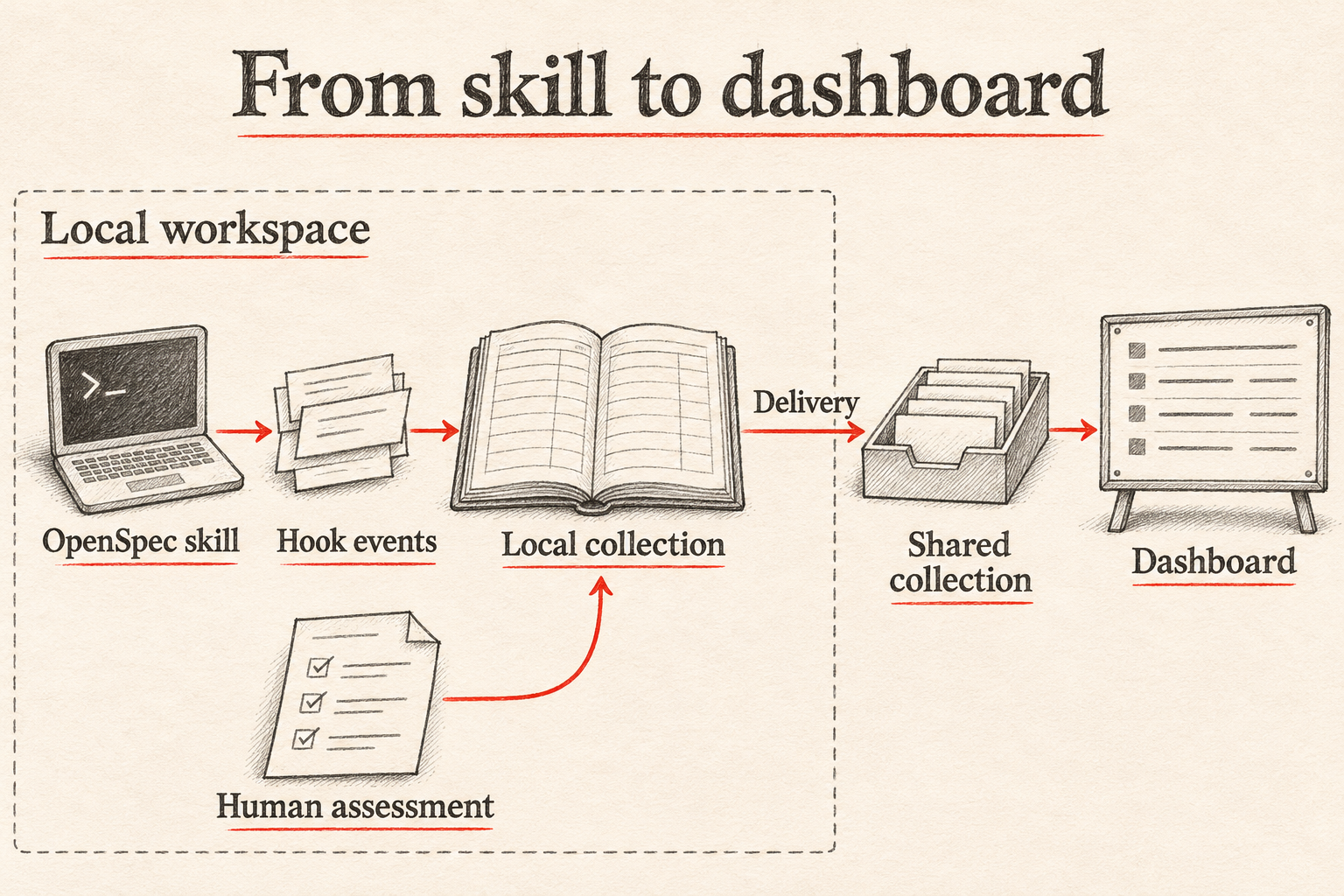
The collector sees work performed through tracked calls. Discussions outside this process, independent edits and other actions may fall outside its scope. The time in the report needs to be read with that scope in mind.
What the participant adds
After completing their part, the participant fills in a short questionnaire. It covers the result, time spent on rework and estimated effort without the agent.
The participant fills in this part themselves. The call log shows that a stage ran. The person assesses how useful the result was and what needed to be redone.
When several roles work on a task, each assesses their own contribution. The developer covers implementation; the analyst covers the requirements work they prepared. This brings the task's data together while keeping the participants' contributions identifiable.
Agent time and the person's review time are considered separately. A quick generation can require a long review and rework. Further calls to the agent are also part of producing the result.
What to compare it with
The estimate of how long the work would have taken manually helps compare the usual approach with agent-assisted work. It remains the participant's estimate: they did not complete the same task a second time without AI.
A calculation based on that estimate does not establish a speedup by itself. Familiarity with the task, its complexity and the amount of checking affect it. The report also needs execution data and an assessment of the result's quality.
This makes it possible to examine individual cases: where the agent produced a usable result, where several attempts were needed and which part still required substantial manual work. A single figure for the whole task is not enough for that.
Checking that collection works
Part of the setup is following the data all the way to the dashboard. An installed collector and a successful diagnostic check do not yet confirm that events from a real session will appear in the report.
For an end-to-end check, a stage is run on a trial task. The next checks are whether the event was saved and whether the report contains a record associated with the correct task and participant. Delivery failures should allow accumulated data to be sent later; retries should not increase effort that has already been counted.
Missing data also needs investigation. An empty section may mean that a stage was not run through a tracked skill, or that the record has not arrived yet. That section alone cannot establish that the person did not do the work.
After setup, checking continues on ordinary tasks. If a stage took place but is missing from the report, the record has to be traced from the skill call through to its appearance on the dashboard.